


WGAL News 8 and Weather
4.5766.00 Reviews
App Specs
- Version
- Varies with Device
- Updated On
- License
- Free
- Downloads
- 100,000+
- Developer
- HTVMA Solutions, Inc.
- Categories
- News & Magazines
- Platform
- Android
Screenshots
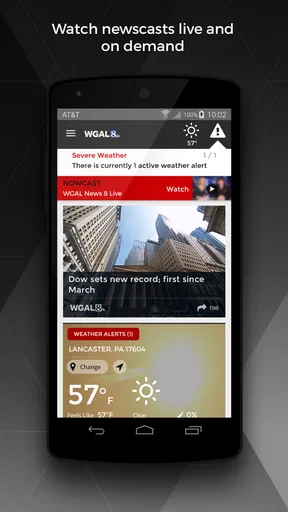
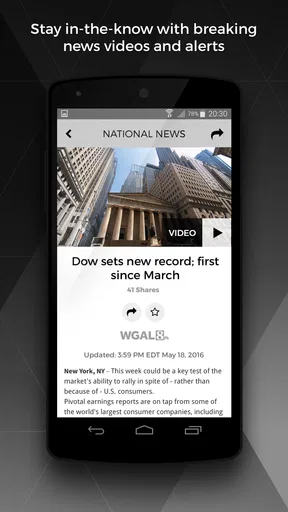
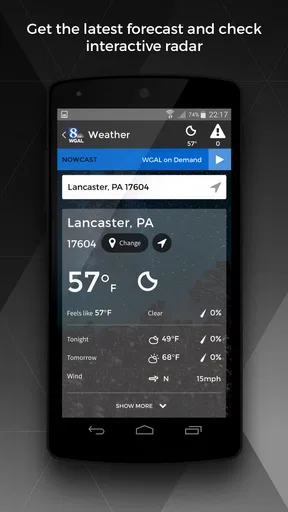
 Analysis by AppCompare
I tend to keep a local news app installed for one simple reason: when something changes quickly, I want information from a newsroom that is actually close to the event. WGAL News 8 and Weather is built around that habit. It is a free News & Magazines app from HTVMA Solutions, Inc. that brings WGAL News 8 coverage to a phone, with particular attention to breaking news, local stories, and weather updates.
After spending time with it, I see it as a focused companion for people who follow the WGAL viewing area rather than as a complete replacement for every news source. Its value comes from convenience and local relevance. I can open one app instead of searching through a browser, checking a general national news service, and then trying to find a local forecast separately. That narrow purpose is also its main limitation: readers outside the station’s coverage area will get much less from it.
What the app is really useful for
The first thing I noticed is that the experience makes the most sense when I treat it as a quick check-in tool. I would use it before leaving home, during a developing local story, or when I need a regional weather update without sorting through unrelated headlines. The app’s store summary promises real-time access to breaking, local, and weather news, and that focus is clear in the way I think about its role: it is for staying connected to WGAL News 8 coverage, not for building a worldwide reading list.
That distinction matters. General news applications often give me a huge stream of national and international stories, but local details can be buried. A browser search can find local reporting, yet it adds extra steps and may present results from many sources with different levels of context. A television news app can sit between those choices: more direct than a search engine, but more geographically specific than a national aggregator.
In an everyday situation, I might be getting ready for work while rain is moving through the area. Instead of opening several services, I would check the local weather coverage, scan the latest headlines, and decide whether I need extra travel time. Later, if a road closure or severe weather story develops, the same app gives me a familiar place to revisit. That workflow is more useful than simply saying that the app contains news; it turns the phone into a local information checkpoint.
The app is also a reasonable fit for people who already recognize WGAL News 8 as their preferred local newsroom. Familiarity reduces the effort of deciding which source to trust for a regional story. I do not have to compare a long list of unfamiliar outlets every time I want a quick update. For someone who watches the station’s coverage, the app feels like an extension of that relationship rather than a separate news habit.
Trust starts with a clear local purpose
For a news app, trust is not only about speed. It is also about knowing what kind of source I am opening and what the app is designed to do. Here, the developer is identified as HTVMA Solutions, Inc., while the content identity is tied to WGAL News 8. That gives the app a more specific editorial context than an anonymous headline reader or a general feed that mixes publishers without much explanation.
Worth Reading Before You Choose

EA SPORTS FC Mobile 26 Is a Bigger Football Game, but It Takes Time

Flipboard Shows What News Apps Must Do Beyond the Feed

Switching to Android Auto Means Rethinking Your Driving Routine

Google Calendar Makes a Crowded Week Easier to Manage

Ludo King Makes the Most of the Minutes Between Plans

Baby Panda World Brings Quick Play to Modern Phones, but Its Game Library Feels Busy
The public response is strong enough to suggest that many people find the app useful: it carries a 4.5 average from around 3.3 thousand ratings, with more than 700 written reviews. It has also passed the 100 thousand install mark. I do not treat those figures as proof that every experience will be smooth, but they do indicate that the app has reached a meaningful audience and has attracted substantial feedback.
It is worth keeping expectations realistic. A local newsroom app cannot guarantee that every developing event will appear at the exact moment it happens, and no weather source removes uncertainty from a changing forecast. I would still use judgment during dangerous conditions and follow official emergency instructions when appropriate. The app can help me notice a story and understand its local context, but it should not become my only decision-maker in a serious emergency.
The age classification is Everyone, which makes the app broadly approachable for households that want a local news source on a shared device. That label describes the intended audience, not a promise that every headline will feel comfortable for every reader. Breaking news can involve accidents, storms, crime, or other difficult subjects. Parents and caregivers may still want to decide when younger readers should browse independently.
Controls and choices deserve attention
One detail I consider important with any news application is how much control I have over interruptions. Breaking coverage is useful only if it reaches me at a sensible time. Before relying on alerts, I would review the app’s notification access in the phone’s system settings and decide whether immediate notices fit my routine. If I am working, sleeping, or trying to reduce distractions, I would rather keep alerts limited than allow every update to compete for attention.
This is one of the app’s practical trade-offs. Timely information often requires some form of notification, but the same feature can make a phone feel noisy. I would begin conservatively, observe how often the app interrupts me, and adjust the system permission if the balance is wrong. That approach gives me more control than accepting every prompt automatically.
I also prefer to check the device’s permission manager instead of assuming that an app needs access simply because it is a news product. The available permissions and choices can depend on the operating system and the version installed, so I would read each request in context. If a permission does not make sense for the way I plan to use the app, I would pause and decide whether the app remains useful without it.
The same principle applies to privacy choices. I would look at the app’s current privacy disclosures and the controls presented during setup or in the device settings, then make decisions based on my own comfort level. I do not regard a convenient local forecast as a reason to grant every optional access request. A careful setup takes only a little time and makes the rest of the experience feel more deliberate.
There is another useful habit: I would periodically revisit notification and privacy settings after an operating-system update or an app update. Mobile controls can change over time, and a setting that made sense months ago may no longer match my routine. This is especially relevant for a news app because my needs can change with the season, work schedule, or level of interest in local events.
Handling sensitive moments without losing agency
News apps are most valuable when something is happening, but those are also the moments when I am most likely to react quickly. A sudden alert can encourage me to open a headline before I have enough context. I try to slow down, read the full report, and distinguish between a developing update and a confirmed explanation. That is not a criticism unique to this app; it is a sensible way to use any fast-moving news service.
Weather deserves the same care. A forecast can influence commuting, school arrangements, outdoor plans, and travel, yet conditions can change across a relatively small area. I would use the app to stay informed about regional developments, then combine that information with the actual conditions around me and any official local guidance. The best use is as an early-warning and context tool, not as a substitute for common sense.
I would also avoid forwarding a dramatic headline before checking when it was published and whether the story has been updated. In a breaking situation, the first version may be shorter or less complete than a later report. My practical workflow would be to revisit the article, look for newer information, and avoid treating a notification preview as the whole story.
For families, shared devices introduce another consideration. Because the app is rated Everyone, it may appear suitable for a wide audience, but local news can still include upsetting coverage. I would use the phone’s notification settings to prevent sensitive headlines from appearing unexpectedly on a lock screen, especially if other people can see the device. That is a small privacy and comfort improvement that is easy to overlook.
Location is another area where I prefer to be careful. A local news app is useful even when I choose to enter or view a region manually, if that option is available in my setup, so I would not automatically approve location access. I would first understand what the app is asking for and whether the benefit is worth it. If I am only checking general regional coverage, I may prefer the least intrusive arrangement that still gives me the information I need.
Where it beats the usual alternatives
Compared with opening a mobile browser, this app should feel more direct for repeat visits to WGAL News 8 coverage. I do not need to remember a web address or search for the right local page each time. That convenience matters most when I am in a hurry, such as checking conditions before a commute or looking for an update during a developing event.
Compared with a national news aggregator, its strength is focus. Aggregators are better when I want politics, business, science, entertainment, and international coverage from many publishers in one place. They can also be useful for comparing perspectives. This app is better when my question is local and immediate: what is happening in the area covered by WGAL News 8, and what weather information is relevant there?
Compared with a dedicated weather service, the app’s advantage is combining weather with newsroom context. A specialized weather tool may offer a deeper set of meteorological views or more granular forecasting tools, depending on the product. I would choose that kind of service if I plan outdoor work, need detailed planning information, or want weather-specific controls. I would choose this app when I want weather alongside local reporting rather than weather alone.
Compared with watching television, the phone format is more flexible. I can check an update when I am away from the television or when a full broadcast is not practical. The trade-off is that a mobile article or alert may not provide the same sense of a scheduled newscast or continuous presentation. I see the app as complementary for someone who already follows the station, not necessarily as a total replacement for every way of consuming its coverage.
Who should install it, and who should pass
I would recommend it to people living in or regularly traveling through the WGAL News 8 coverage area who want a straightforward local news shortcut. It is particularly suitable for commuters, families tracking regional weather, residents who want breaking local headlines, and existing viewers who would like access away from the television. The fact that it is free removes the usual subscription decision, so trying it as a secondary news source is relatively easy.
I would be more cautious about recommending it to someone who wants one app for the entire world. Its local identity is an advantage for regional coverage but a limitation for broader reading. A person who mainly follows national markets, international events, specialist reporting, or several cities at once will probably be happier with a broader service and may find this app too narrow.
I would also suggest skipping it if notifications are a major source of stress and the user does not want to manage them. The app can still be opened manually, but a news product’s appeal is closely connected to timely updates. Someone seeking a quiet, occasional reading experience may prefer a browser bookmark or a publication that delivers fewer interruptions.
For privacy-conscious users, my advice is not an automatic yes or no. I would install it only after reviewing the choices shown by the current app and operating system, then deny anything unnecessary for the intended routine. The important point is that convenience should not replace informed consent. If the available controls do not match your comfort level, a browser-based approach may give you a better sense of separation.
My measured verdict
WGAL News 8 and Weather succeeds when I use it for what it is: a focused local news and weather companion connected to WGAL News 8. It is free, broadly accessible under its Everyone age classification, and supported by a sizeable user base. Its strongest quality is not an elaborate collection of extras; it is the ability to put regional coverage in a convenient place for people who care about that specific area.
The app is not the right single source for every kind of information. I would pair it with a broader news service for national and international stories, and with a specialized weather tool when detailed forecasting matters. I would also manage notifications, permissions, and privacy choices instead of accepting them without thought. Those steps make the experience calmer and help keep the app in its proper role.
My recommendation is cautious but positive: install it if local WGAL coverage is central to your daily routine, especially if you want quick access during changing weather or developing regional news. Skip it if you live outside its practical coverage area or expect a full-spectrum news platform. Used with sensible controls and a little patience around breaking updates, it is a useful local checkpoint rather than an app I would rely on for everything.
Pros
- Reliable local news coverage for Pennsylvania’s Susquehanna Valley.
- Live weather updates
- forecasts
- radar
- and severe-weather alerts.
- Push notifications help users stay informed about breaking news.
- Video reports and livestreams provide more context than headlines alone.
- Easy access to school closings
- traffic
- and community updates.
Cons
- Coverage is mainly useful to viewers in the WGAL viewing area.
- Frequent notifications may feel excessive unless carefully customized.
- Some articles and videos may load slowly on weaker connections.
- Advertising can interrupt browsing and make pages feel crowded.
- Certain features may require location access or other device permissions.
FAQs for WGAL News 8 and Weather
What is WGAL News 8 and Weather?
WGAL News 8 and Weather is a local news and weather app focused on the Susquehanna Valley, including areas such as Lancaster, Harrisburg, York, and Lebanon. It typically provides breaking news, live or on-demand video, weather forecasts, radar maps, severe-weather alerts, school closings, traffic information, and other regional updates in one mobile application.
Does the WGAL News 8 and Weather app provide reliable local weather information?
The app is designed to provide localized forecasts, current conditions, hourly and extended outlooks, radar imagery, and alerts for significant weather events. During a review, users should still remember that forecasts can change quickly, especially during storms. Enabling location access or manually selecting a community can help ensure that weather information and warnings are relevant to the user’s area.
Can I watch WGAL News 8 live through the app?
Depending on your location, device, internet connection, and the station’s current streaming availability, the app may offer live newscasts, special reports, or video coverage. Some content can also be available on demand after a broadcast. Streaming features may require a stable Wi-Fi or mobile-data connection, and certain programs or clips could be restricted by licensing or regional availability.
Are severe-weather alerts and breaking-news notifications available?
Yes, the application generally supports push notifications for important local developments, including breaking news, severe thunderstorms, tornado warnings, flooding, winter weather, and other urgent updates. Users can usually manage notification categories in the app or device settings. Keeping notifications enabled is useful for timely warnings, although the app should complement—not replace—official emergency services and local authorities.
Is WGAL News 8 and Weather free to download and use?
The app is generally available to download at no charge, allowing users to access local headlines, forecasts, videos, and alerts. However, it may contain advertising, and streaming video or frequent image loading can consume mobile data. Some features may also vary by platform or region. Before downloading, review the app-store listing for current compatibility, permissions, privacy details, and any updated terms.


